How to Create a Trending Ganesh Name and Logo Reveal Video Editing
Ganesh festival is one of the most popular celebrations in India, and creative videos are now an important part of sharing festival wishes on social media. A Ganesh Name and Logo Reveal Video can make your Instagram Reels, YouTube Shorts, and WhatsApp Status look attractive and professional. The good news is that you can create this type of trending video directly from your mobile phone.
What Is a Ganesh Name and Logo Reveal Video?
A name and logo reveal video is a short video where a Ganesh image, festival background, name, or custom logo appears with attractive animation, lighting effects, particles, and music. You can create a personalized video by adding your own name, Instagram page name, YouTube channel logo, or business logo.
What You Need Before Editing
Before starting the editing process, keep the following items ready:
- A high-quality Ganesh image
- Your name or page name
- Logo in PNG format, if available
- A suitable background image or video
- Festival-themed music
- A mobile video-editing application
Using high-resolution images will help your final video look sharper, especially when uploaded to Instagram or YouTube.
How to Create the Video on Mobile
First, open your preferred video-editing application and create a new project. Select a suitable Ganesh background or festival video and set the project ratio according to the platform. For Instagram Reels and YouTube Shorts, a 9:16 vertical format is generally suitable.
Next, import your Ganesh image and position it in the centre of the screen. You can use animation effects to make the image appear gradually. Add your name using a bold and stylish font. Gold, white, or bright text can create an attractive festival-style appearance.
After adding the name, import your logo if you have one. Place it below or beside the name and apply a simple reveal animation. You can also use glow, light-flare, particle, smoke, or sparkle effects to make the reveal more impressive.
Add Music and Sound Effects
Music can make the reveal video much more engaging. Choose suitable Ganesh devotional or festival music that you are legally allowed to use. Add a short sound effect when the name or logo appears. Synchronizing the reveal animation with the beat can give the video a professional feel.
Export and Share
Once your editing is complete, preview the entire video and check the text, logo position, animation, and audio. Export the video in high quality. For social media, avoid unnecessary compression and use the appropriate vertical resolution.
Final Tips
Keep the video short, clean, and visually balanced. Do not use too many effects because excessive animatios can make the design difficult to understand. A clear Ganesh image, stylish name, simple logo animation, and well-timed music are enough to create an attractive festival reveal vide
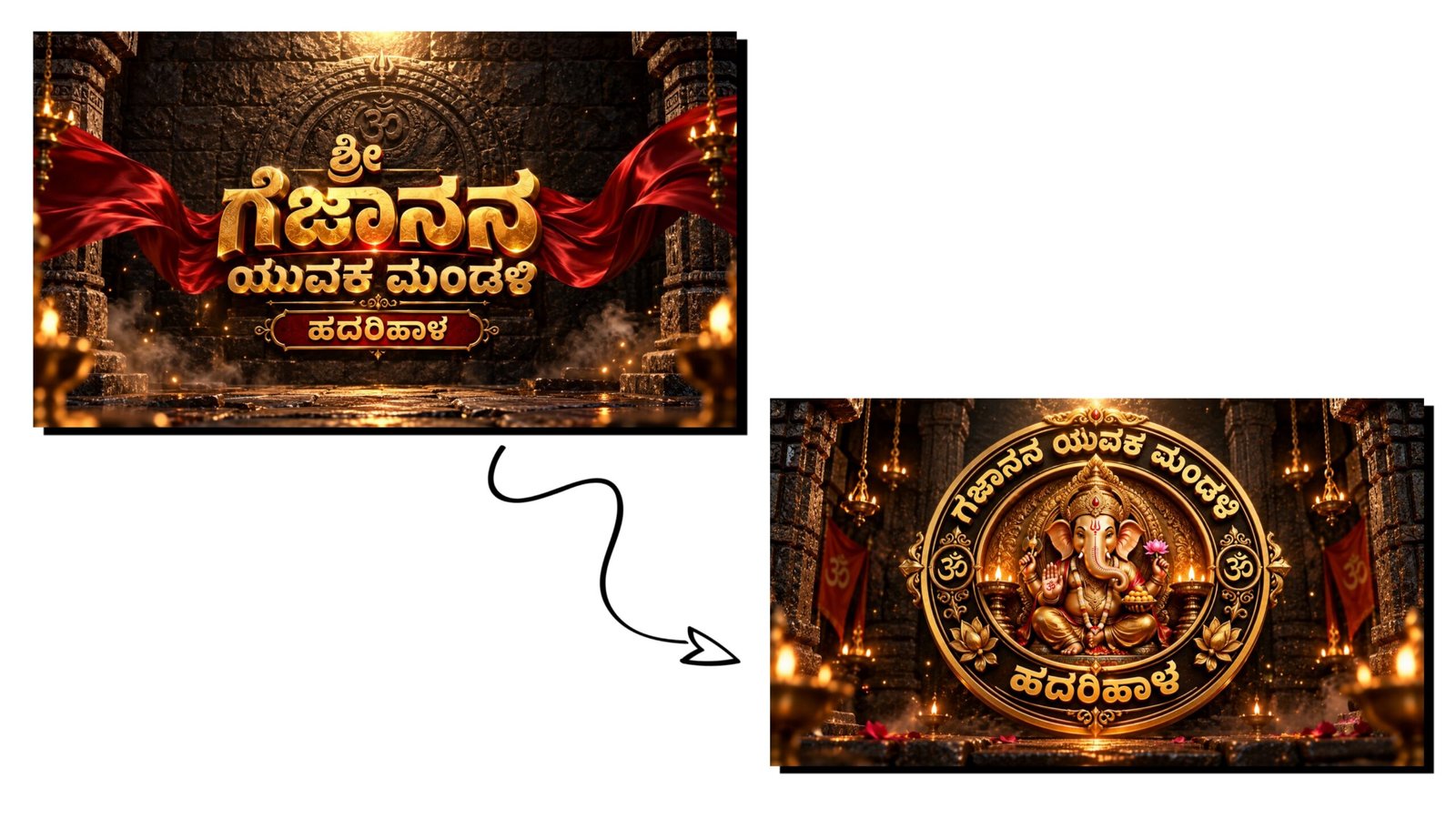
Imeg Promt : A premium cinematic 3D typography poster with the text “BSY YOUTH” in massive embossed metallic gold letters, featuring ultra-detailed engraved textures, beveled edges, realistic reflections, and glowing golden highlights. Below it, a smaller metallic gold subtitle reading “ASSOCIATION”.

Background: Dark ancient black stone wall with cracked textures and a faint circular carved temple emblem behind the text.

Two luxurious deep crimson silk cloth ribbons flow dynamically around the title with realistic fabric physics and elegant motion.

Atmosphere filled with glowing orange embers, floating sparks, golden dust particles, subtle smoke, dramatic volumetric lighting, cinematic shadows, warm orange rim light. HDR illumination, high contrast, ultra-realistic, epic festival mood.

Centered composition, premium movie title reveal style, luxury branding. Unreal Engine 5, Octane Render, ray tracing, global illumination, photorealistic, 8K, ultra sharp, masterpiece.

Aspect Ratio: 16:9
Imeg Promt 2 : A luxurious circular 3D golden emblem featuring Lord Ganesha seated gracefully at the center with intricate Indian temple carvings, highly detailed ornaments, crown, jewelry, lotus, modak bowl, blessing hand, and sacred symbols.
The outer circular ring is engraved with customizable metallic gold text.
Top Curve: BSY YOUTH
Bottom Curve: ASSOCIATION
Decorative lotus motifs, traditional floral engravings, glowing diyas on both sides, elegant ornamental details, polished gold finish with realistic reflections and engraved textures.
Background: Dark aged black stone wall with weathered texture, cinematic warm lighting, floating glowing embers, subtle smoke, golden particles, dramatic volumetric light, divine aura, festival atmosphere.
Premium luxury badge design, centered composition, ultra realistic, Unreal Engine 5, Octane Render, ray tracing, global illumination, HDR, photorealistic, 8K, masterpiece.
Aspect Ratio: 16:9Video Create Promt : CINEMATIC 3D TITLE REVEAL VIDEO PROMPT
Use the first uploaded image as the exact Start Frame and the second uploaded image as the exact End Frame.
Create an 8–10 second premium cinematic 3D title reveal with the visual quality of Cinema 4D, Octane Render, Unreal Engine 5.
The video begins with an extreme macro close-up of the ancient black stone wall and the metallic gold letters. The camera slowly glides across the beveled gold typography, revealing engraved details, scratches, polished reflections, and glowing golden edges. Warm orange light sweeps across the metal surface while tiny embers, golden dust, and subtle smoke drift naturally through the scene.
The deep crimson silk ribbons gently move with realistic fabric physics around the title. The metallic gold surface comes alive with animated reflections and soft golden glow, as if illuminated by hidden cinematic lights. Every engraved detail becomes more visible as the camera continues its slow, elegant movement.
After revealing the full title, the camera smoothly pulls back while remaining perfectly centered. Golden particles begin swirling toward the center, forming a divine circular aura. The premium golden emblem of Lord Ganesha gradually appears from the glowing particles with realistic metallic reflections, embossed carvings, lotus motifs, sacred ornaments, and polished gold details. The reveal must feel majestic, luxurious, and cinematic, like the opening logo of a blockbuster film.
The camera finally stops on the completed emblem, matching the second uploaded image exactly. Hold the final frame for one second with a divine golden aura, floating embers, volumetric light rays, and subtle smoke.
Preserve every element exactly as provided in both images. Do not redesign or regenerate Lord Ganesha, the typography, emblem, ribbons, carvings, stone wall, lighting style, colors, composition, or proportions. Keep the visual identity consistent throughout the animation.
Negative Prompt: No camera shake, no fast movements, no cartoon style, no low quality, no blurry textures, no text distortion, no spelling changes, no morphing of the title, no redesign of the emblem, no extra objects, no missing details, no flickering, no deformation, no perspective changes, no color shifts. The first frame must match the first uploaded image exactly, and the final frame must match the second uploaded image exactly.