
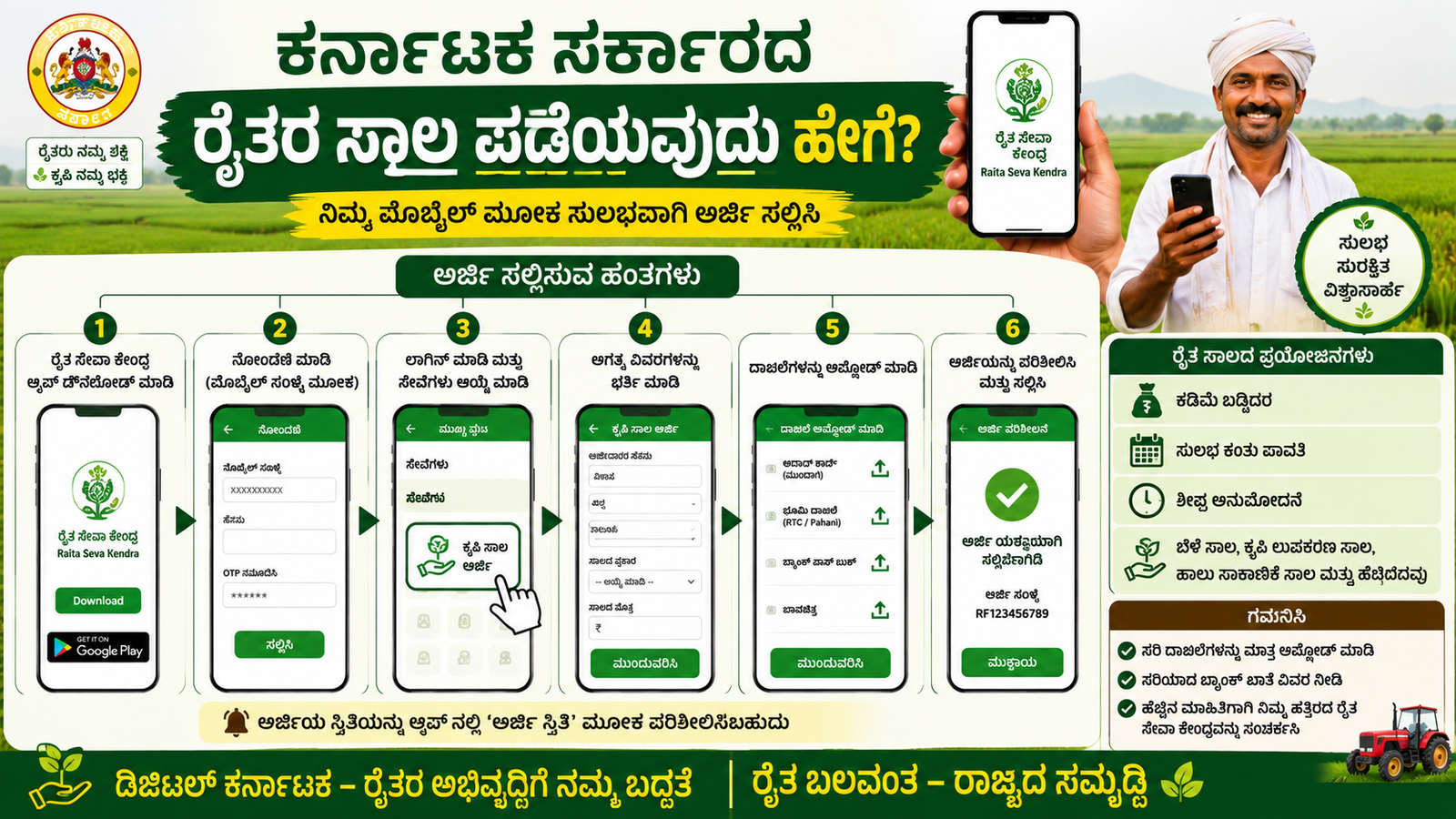
How to Apply for Karnataka Government Farmer Loan Using Your Mobile
Farmers in Karnataka can apply for various government-supported agricultural loans directly through their mobile phones. These loans help farmers purchase seeds, fertilizers, farming equipment, irrigation systems, and meet other agricultural expenses. The Karnataka Government, along with banks and cooperative societies, provides easy access to farmer loans through online platforms.
What is a Farmer Loan?
A farmer loan is financial assistance provided to eligible farmers for agricultural activities. These loans usually come with lower interest rates and flexible repayment options. Small, marginal, and large farmers can benefit from these schemes depending on their eligibility.
Benefits of Karnataka Farmer Loan
| Benefit | Details |
|---|---|
| Low Interest Rate | Government-supported loans often have reduced interest rates. |
| Easy Application | Farmers can apply online using a mobile phone. |
| Financial Support | Helps purchase seeds, fertilizers, and equipment. |
| Flexible Repayment | Repayment is usually aligned with crop seasons. |
| Subsidy Benefits | Eligible farmers may receive interest subsidies. |
Documents Required
Before applying, keep the following documents ready:
- Aadhaar Card
- Mobile Number linked with Aadhaar
- Bank Account Passbook
- Land Records (RTC/Pahani)
- Passport-size Photograph
- Income Certificate (if required)
- Farmer ID or FID Number (if available)
Steps to Apply for a Farmer Loan Using Mobile
Step 1: Visit the Official Portal
Open the Karnataka farmer services portal or the bank’s official loan application website on your mobile browser.
Step 2: Register or Login
Create a new account using your mobile number and Aadhaar details. Existing users can log in directly.
Step 3: Select Farmer Loan Scheme
Browse the available agricultural loan schemes and choose the one that matches your farming requirements.
Step 4: Fill the Application Form
Enter personal details, land information, crop details, and bank account information carefully.
Step 5: Upload Documents
Upload scanned copies or clear photos of the required documents.
Step 6: Submit the Application
Review all entered details and submit the application online.
Step 7: Track Application Status
After submission, you will receive an application number. Use this number to check the loan status through your mobile.
Important Tips
- Ensure your Aadhaar and mobile number are linked.
- Enter accurate land and bank details.
- Keep document images clear and readable.
- Apply only through official government or bank portals.
- Save the application reference number for future tracking.
Conclusion
The Karnataka Government has made it easier for farmers to apply for agricultural loans through mobile phones. With a few simple steps, farmers can submit their applications online without visiting multiple offices. These loans provide essential financial support for farming activities and help improve agricultural productivity. Farmers should keep all required documents ready and apply through official platforms to enjoy the benefits of government-supported loan schemes quickly and safely.






