
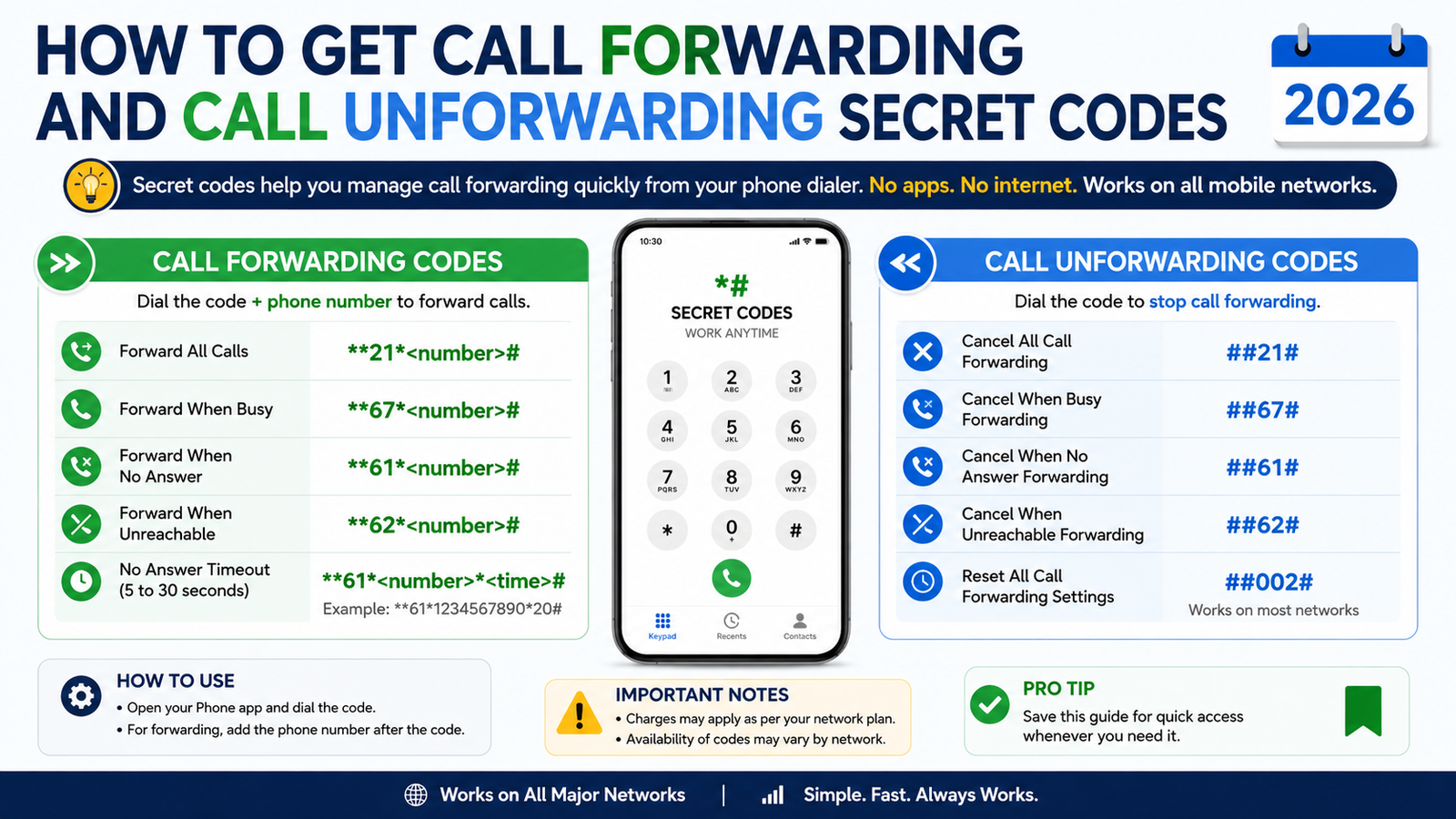
How To Get Call Forwarding and Call Unforwarding Secret Codes in 2026
Call forwarding is a useful mobile feature that allows users to redirect incoming calls from one number to another. This feature is helpful when your phone is switched off, out of network coverage, busy, or when you want to receive calls on another device. In 2026, most telecom operators such as Jio, Airtel, BSNL, and Vi continue to support call forwarding through simple USSD codes.
What is Call Forwarding?
Call Forwarding is a service that automatically transfers incoming calls from your mobile number to another phone number. It helps ensure that you never miss important calls even when your primary phone is unavailable.
Benefits of Call Forwarding
- Never miss important calls.
- Useful during travel or network issues.
- Redirect business calls to another number.
- Manage personal and professional calls easily.
- Works on most Android and iPhone devices.
Call Forwarding Secret Codes in 2026
The following standard GSM codes work on many mobile networks:
| Function | Code |
|---|---|
| Forward all calls | **21*Mobile Number# |
| Forward when busy | **67*Mobile Number# |
| Forward when not answered | **61*Mobile Number# |
| Forward when unreachable | **62*Mobile Number# |
| Check forwarding status | *#21# |
| Cancel all forwarding | ##002# |
| Cancel all-call forwarding | ##21# |
Example
If you want to forward all calls to 9876543210, dial:
**21*9876543210#
Then press the call button.
How to Enable Call Forwarding
On Android
- Open the Phone app.
- Tap the three-dot menu.
- Select Settings.
- Open Calling Accounts or Supplementary Services.
- Tap Call Forwarding.
- Choose the forwarding option.
- Enter the destination mobile number.
- Save the settings.
On iPhone
- Open Settings.
- Tap Phone.
- Select Call Forwarding.
- Turn on Call Forwarding.
- Enter the number where calls should be forwarded.
- Save the settings.
How to Disable Call Forwarding
If you no longer need call forwarding, dial:
##002#
This universal code usually removes all active call forwarding settings from your number.
You can also disable it from your phone’s call settings menu.
Important Things to Know
- Some operators may charge normal call rates for forwarded calls.
- The destination number must be active.
- Call forwarding support may vary depending on your network and plan.
- Always verify the forwarding number before activation.
- International forwarding may incur additional charges.
Conclusion
Call forwarding is one of the most useful mobile features available in 2026. Whether you use Android or iPhone, you can easily activate or deactivate this service using simple secret codes. The universal code ##002# is especially useful for removing all active forwarding settings. By understanding these call forwarding and unforwarding codes, you can manage your calls more efficiently and ensure you never miss important conversations.
Call Farwording Code : - *21* ( Mobile Noumber ) #Call Unfarwording Code : - #002#





