How To Update Your Aadhaar Card Using Mobile
Introduction
The Aadhaar card is one of the most important identity documents in India. It is issued by the Unique Identification Authority of India and contains your personal details such as name, address, date of birth, mobile number, and photograph. If any information on your Aadhaar card is incorrect or outdated, you can easily update it using your mobile phone without visiting an Aadhaar center for some services.
Details That Can Be Updated Online
The following information can generally be updated through the Aadhaar self-service portal:
| Aadhaar Detail | Online Update Available |
|---|---|
| Address | Yes |
| Mobile Number | Visit Aadhaar Center |
| Name | Limited Cases |
| Date of Birth | Limited Cases |
| Gender | Limited Cases |
Always check the latest update options on the official UIDAI website.
Requirements Before Updating Aadhaar
Before starting the update process, keep the following ready:
- Aadhaar Number
- Registered Mobile Number
- Internet Connection
- Address Proof Document (if updating address)
- Smartphone or Computer
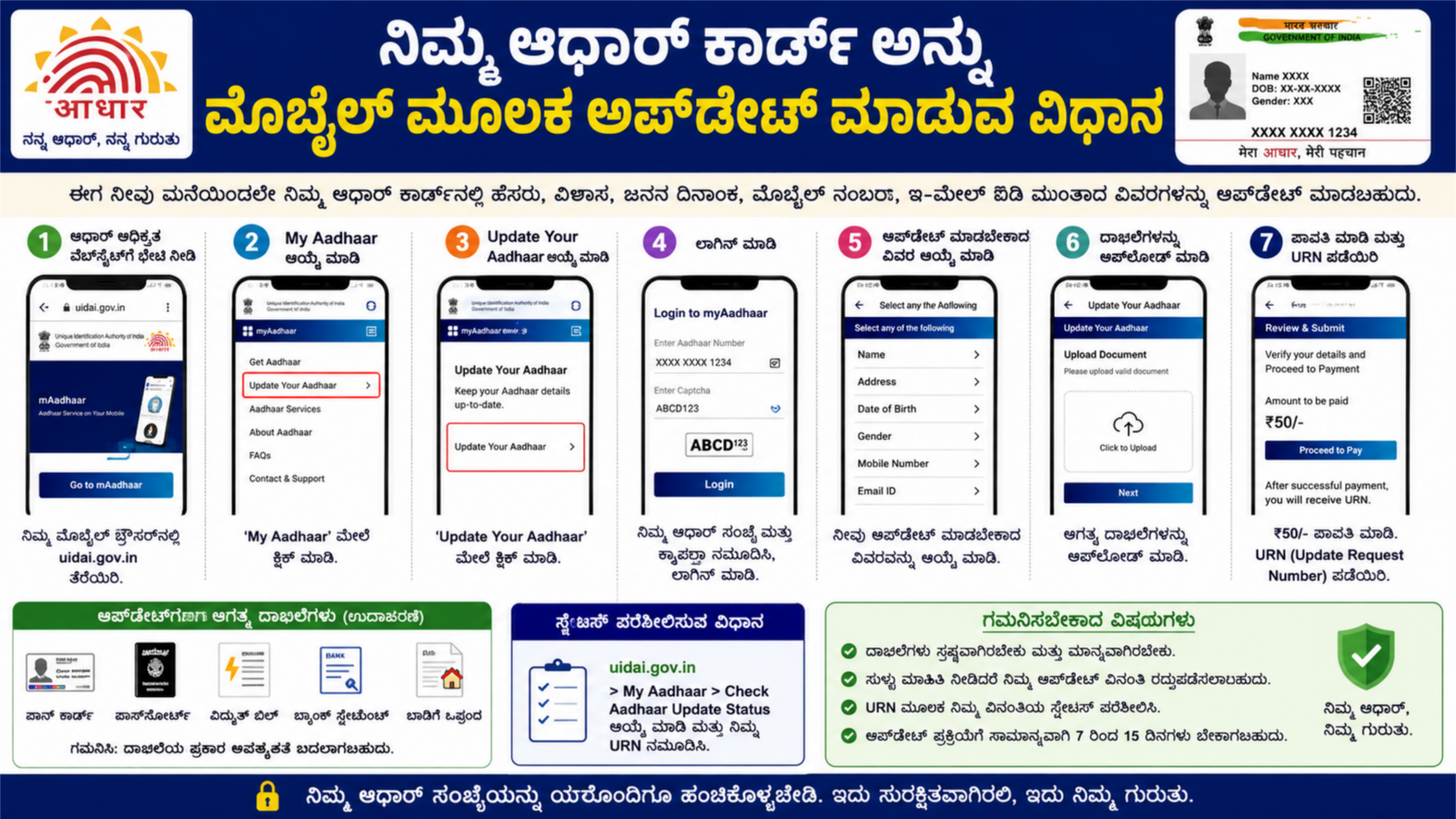
Steps to Update Aadhaar Card Using Mobile
Step 1: Visit the Official UIDAI Website
Open your mobile browser and visit:
UIDAI Official Website
Step 2: Login to Aadhaar Services
Click on My Aadhaar and select the Aadhaar update option. Enter your Aadhaar number and verify the OTP sent to your registered mobile number.
Step 3: Select the Detail to Update
Choose the information you want to update, such as your address or other eligible details.
Step 4: Upload Required Documents
Upload a clear scanned copy or photo of the required supporting document. Ensure that the document is valid and readable.
Step 5: Review and Submit
Check all entered details carefully. After verification, submit your request.
Step 6: Save the Update Request Number
After submission, you will receive an Update Request Number (URN). Save this number for tracking your application status.
How to Check Aadhaar Update Status
You can track your Aadhaar update request by visiting the UIDAI website and entering your URN. The system will display the current status of your application.
Benefits of Updating Aadhaar Online
- Saves time and travel expenses
- Easy process from home
- Secure OTP verification
- Quick status tracking
- Available 24/7 through the UIDAI portal
Important Tips
- Use only the official UIDAI website.
- Ensure your registered mobile number is active.
- Upload clear and valid documents.
- Double-check all details before submission.
- Keep your URN safe until the update is completed.
Conclusion
Updating your Aadhaar card through your mobile phone is a simple and convenient process. By using the official UIDAI portal, you can correct or update eligible details without standing in long queues. Always keep your Aadhaar information accurate and up to date to avoid issues while using government and banking services. This makes identity verification faster and ensures smooth access to various benefits and schemes.